Solar Task
With VC Solar, you enrich your CityGML building model with information about solar irradiation in just a few steps. You receive monthly irradiation values for direct, diffuse, and global solar radiation.
For the calculation of solar irradiation, VC Solar uses a method based on the ray-tracing principle. First, a model for the sun positions (Figure 1) is generated for the calculation of direct radiation, and a model of the sky dome (Figure 2) for diffuse radiation. Both models are represented as points. Additionally, a point grid is generated on all building surfaces. When the sun points and hemisphere points are connected with the point grid, rays are created, which are then checked for intersections with surrounding objects. Thus, all unshaded rays can be considered for the calculation of the incoming radiation. The calculation of solar irradiation is performed separately for direct, diffuse, and global radiation. Direct radiation is calculated only from unshaded sun rays, while diffuse radiation depends on unshaded hemisphere rays. Global radiation is finally the sum of direct and diffuse radiation.
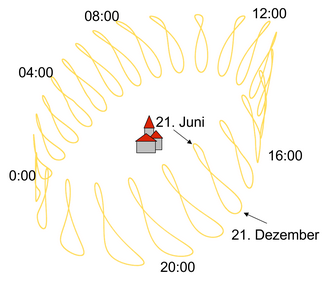
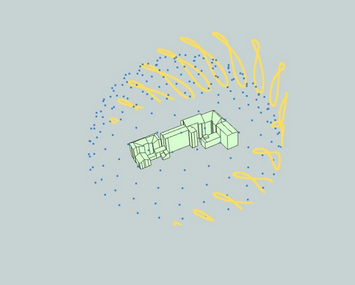
The solar irradiation values are stored as generic attributes in the 3DCityDB or VC DB.
Requirements
-
CityGML model in VC Database / 3DCityDB (PostGIS)
-
Building models, traffic areas, and vegetation objects in LOD2
-
Geometrically correctly modeled objects
Calculation Parameters
The user is guided through the creation process and can make settings at different stages. The calculation of solar irradiation and the subsequent calculation of textures are performed in two separate steps.
| To calculate textures, a calculation of solar irradiation values must be performed beforehand. |
Step 1 - Task Name
| Option | Description |
|---|---|
Solar values and texture |
Here you can start the calculation of solar irradiation. With this option, the irradiation values are calculated first, and then the textures are calculated. |
Only solar values |
Here you can start the calculation of solar irradiation. No textures are calculated and stored in the database. |
Only texture |
Here you can start the calculation of textures. It is mandatory to perform the calculation of solar irradiation beforehand before the textures can be calculated. |
Task Name |
Here you can specify the name of the task. This will be displayed later in the overview of all tasks. |
Step 2 - Database
| Option | Description |
|---|---|
Database connection |
Here you can select the database connection on which the calculation of solar irradiation and textures will be performed. Both connections to a 3DCityDB and a VC Database can be selected. It is mandatory that the selected database contains the necessary CityGML objects (buildings, traffic areas, vegetation objects) in LOD2 and has already been configured and assigned to the project, see also Database Management and Project Management. Only PostGIS databases are supported, Oracle databases are not supported. |
Validate connection to database |
Here you can check the connection to the selected database. It will be verified whether the connection is successfully established and the database is reachable for the job. In case of an error, an appropriate error message will be displayed. |
Step 3 - Settings (Solar)
Shadowing features
Selection of shading objects to be considered in the calculation of solar irradiation.
| Option | Description |
|---|---|
LoD2WallRoof |
CityGML wall and roof surfaces |
LoD2SolitaryVegetationObject |
CityGML vegetation objects |
LoD2TrafficArea |
CityGML traffic areas |
Advanced Settings
Changes to the preset parameters of the advanced settings can lead to significant variations in terms of accuracy and computation time!
| Option | Description |
|---|---|
Semantic building surfaces |
In this dropdown list, you can define on which building surfaces the solar irradiation should be calculated. It is possible to use the roof and/or wall surfaces for the calculation. Multiple selections are possible. Possible values:
|
Semantic traffic surfaces |
If available, this dropdown list defines for which traffic surfaces the solar irradiation should be calculated. Multiple selections are possible. Possible values:
|
Calculation interval (days) |
Here you can specify the interval in days for which the solar irradiation should be calculated. |
Calculation interval (minutes) |
Here you can specify the interval in minutes for which the solar irradiation should be calculated. |
Time zone |
Here you can specify the time zone to be used for the calculation of solar irradiation. It is important to specify the correct time zone, as this affects the calculation of the sun positions and thus the irradiation values. The time zone should be specified in the format "Region/City" (e.g., "Europe/Berlin"). |
Distance point grid [cm] |
Here you can specify the spacing of the point grid generated on the calculation objects (buildings and traffic areas). The smaller the spacing, the more accurate the calculation of solar irradiation, but also the longer the computation time. It is recommended to use a spacing of 200 cm to achieve good accuracy. |
Offset point grid [cm] |
Here you can specify the offset of the point grid generated on the calculation objects (buildings and traffic areas). The offset indicates how far the points of the grid should be from the surface along the surface normals of the calculation objects and prevents self-shading. It is recommended to use an offset of 15 cm to ensure that the points of the grid are not on the surface of the calculation objects, thus enabling accurate calculation of solar irradiation. |
Tile length [m] |
The calculation area is divided into tiles before the actual calculation and processed successively. This parameter specifies the edge length [m] of a tile. All objects of the current calculation tile, including objects from neighboring tiles, are loaded as shading objects. It is recommended to use a tile length of 1000 m to achieve a good balance between computation time and accuracy. |
Step 4 - Settings (Texture)
If in Step 1 the option "Texture Only" or "Irradiation Values and Texture" was selected, you can configure the settings for texture calculation here. It is mandatory to perform the solar irradiation calculation beforehand before textures can be calculated.
| Option | Description |
|---|---|
Create texture (year) |
Calculation of the texture as annual values, taking into account the irradiation values of all calculation intervals for the texture calculation. |
Truncate existing appearances |
Delete already existing solar textures before recalculating |
Create texture (months) |
Calculation of the texture as monthly values, with the option to select specific months. The months January, April, July, and October are selected by default, as they provide a good representation of solar irradiation throughout the year. However, other months can be selected or deselected to analyze specific periods. It is recommended to select at least 4 months to obtain a good representation of solar irradiation throughout the year. |
Advanced Settings
Changes to the default parameters in the advanced settings can lead to significant variations in accuracy and computation time!
| Option | Description |
|---|---|
Lower bound of irradiation values (min.) |
If this parameter is set, the lower limit of the irradiation values used for texture calculation can be freely defined. All irradiation values below this limit will not be considered. |
Upper bound of irradiation values (max.) |
If this parameter is set, the upper limit of the irradiation values used for texture calculation can be freely defined. All irradiation values above this limit will not be considered. |
Prefix for CityGML texture theme |
Here you can specify a prefix for the CityGML texture themes, which will be used during the calculation of the textures. The prefix is added before the name of the texture theme and allows for better organization and distinction of the textures in the database. It is recommended to use a meaningful prefix to easily identify the textures (e.g., "Solar_"). |
Step 5 - Task Schedule
| Setting | Description |
|---|---|
Start job as soon as possible |
Start the job immediately. |
Start job once at given time |
Schedule the job for the future. |
Repeat job |
The job can be run automatically on a periodic basis. |
Visualization of Solar Irradiation
The solar irradiation values / textures can be visualized in the VC Map to provide a clear representation of the solar irradiation on the buildings and traffic areas. For this, a 3D Object Task must be performed after the solar calculation. Afterwards, the visualization of the solar irradiation can be carried out in the VC Map. Further information on creating a Solar Balloon can be found under Step 6.