XPlan Plugin - Configuration
This section describes the configuration of the XPlan Plugin. In the finished app, the plugin is available via the button  Browse B-Plans in the Tools & Extensions section. The functionality of the XPlan Plugin in the app is described here.
| The plugin supports web services from XPlanung version 5 onwards. |
Clicking on  opens the configuration window, where all available settings can be configured.
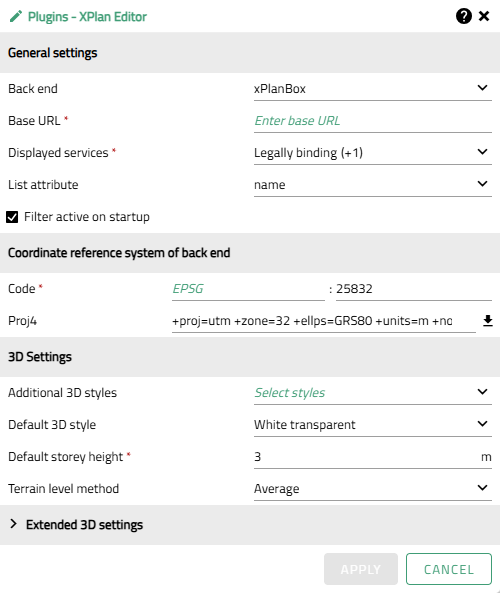
The following settings are possible:
General settings
| Option | Description | ||
|---|---|---|---|
Backend |
Defines which platform is used to publish XPlan data as web services and integrate it into the XPlan plugin.
|
||
Base URL |
Root of the web address on which all other paths and parameters are based in order to reach specific service endpoints of the XPlanBox. Example: |
||
Displayed services |
Defines which service endpoints are requested by the XPlan plugin and displayed in the list view. |
||
List attribute |
Attribute from the plan metadata (object type xplan:BP_Plan) that determines the display name of a plan in the results list. The default value is ‘name’.
|
||
Filter active on startup |
Determines whether the filter window appears automatically when the main window of the plugin is opened for the first time. |
Coordinate reference system of the backend
| Option | Description |
|---|---|
Code |
The code of the coordinate reference system (CRS) of the backend, e.g. 'EPSG:25832'. Syntax: |
Proj4 |
The Proj4 definition associated with the code. Can be automatically retrieved from the server (https://epsg.io) by clicking on the adjacent icon. |
3D settings
| Option | Description | ||
|---|---|---|---|
Additional 3D styles |
Selection of additional layer styles from the app configuration for visualizing the 3D cubes. |
||
Default 3D style |
Selection of the style in which objects are displayed when activated, if no other style has been set manually. |
||
Default storey height |
Height of full storeys for generating 3D cubes based on storey information if no explicit height information is available.
|
||
Terrain level method |
Method for calculating the reference height from the terrain to determine the zero level of the 3D cube, if not explicitly specified via the attribute xplan:hoehenangabe.
|
Extended 3D settings
The extended 3D settings define priorities for the extrusion of 3D cubes based on attribute values of the XPlan objects. Object types considered in the spatial evaluation: xplan:BP_UeberbaubareGrundstuecks-Flaeche, xplan:BP_BaugebietsTeilFlaeche and xplan:BP_HoehenMass. The relevant attributes of height and number of stories are transferred from the specified object types to the cube. In the event of conflicts due to double assignment of the same attribute, the value from xplan:BP_UeberbaubareGrundstuecksFlaeche is always preferred. The object xplan:BP_HoehenMass is only evaluated if no height information is available from other object types.
The order can be adjusted using drag & drop.  resets the order to the default settings. If a reference point or attribute is not to be used for the 3D representation, it can be removed from the list using
  . Removed entries can again be added at any time using
  .
.
| The base area of a cube usually corresponds to the geometry of xplan:BP_UeberbaubareGrundstuecksFlaeche. If this is missing, the geometry of the building zone (Baugebietsteilfläche) is used. |
| Option | Description | ||
|---|---|---|---|
Height attribute priority |
Interpretation order of height attributes for the 3D representation of the building site (if there is more than one height attribute on the cube). The height attribute with the highest priority is applied. Additional attributes are listed in the feature information. |
||
Reference point priority |
Interpretation order of reference points for the 3D representation of the building site (if there is more than one height attribute on the cube). The height attribute with the highest priority reference point is applied. Additional attributes are listed in the feature information. Each reference point is assigned a type for 3D interpretation, which defines whether the reference point determines the height, zero level, or terrain reference of the cube. This assignment is predefined by default, but can be customized using the drop-down menu if necessary.
|
||
Storey attribute priority |
Interpretation order of storey attributes for the 3D representation of the building site (if there is more than one storey attribute on the cube). The storey attribute with the highest priority is applied. Additional attributes are listed in the feature information. |